Why do you need an IT disaster recovery plan?
Imagine this: Your wide area network (WAN) backbone is cut, or a team member misconfigures a change request affecting numerous application services, or a cyber attack cripples your systems, or even a simple power outage takes down your applications or entire data center. Suddenly, your customers are shut out of services, internal teams can’t operate, and overall business comes grinding to a halt. Data is lost, operations are disrupted, customers are frustrated and no one is sure how to get everything back online. You had better hope you have a well-defined and automated IT DR plan.
What is a disaster recovery plan?
An IT DR plan is a set of policies, procedures, and tools designed to help your organization recover quickly and efficiently from unplanned events that disrupt your IT systems and applications. It’s your company’s lifeline to ensure that, even in the face of adversity, your business can bounce back with minimal downtime, data loss and financial impact.
The risks of not having a good IT disaster recovery plan
No matter how many advanced measures you put in place to avoid disasters and outages, the unfortunate truth is that they are completely unavoidable. There are simply too many external factors that lead to business disruption and customers and clients aren’t particularly forgiving when these outages arise. An outage can have severe consequences on the business, including:
- Financial losses: Downtime can lead to lost revenue, productivity, and customer trust. A single hour of downtime can cost businesses millions of dollars, depending on their size and industry.
- Reputational damage: A data breach or prolonged outage can damage your brand reputation and erode customer trust, potentially leading to lost customers and future business opportunities.
- Operational disruptions: Disrupted systems can prevent employees from working effectively, leading to delays, missed deadlines, and frustrated customers.
- Legal and compliance issues: Data breaches and other security incidents can lead to legal and regulatory consequences, further adding to the costs and challenges of a disaster.
Human error plays a role in ⅔ to ⅘ of all outages. By having a robust IT DR plan in place, you can significantly mitigate these risks and ensure the continuity of your business operations in the face of any disaster.
The essential elements of an effective IT disaster recovery plan are:
- IT infrastructure/applications defined and prioritized by their criticality
- Different scenarios for potential threats and vulnerabilities such as natural disasters, cyber attacks, power outages, and hardware failures
- An evaluation of the potential impact of threats on critical infrastructure
- An outline of robust backup procedures for all critical systems
- Definitions of data recovery procedures and established recovery time objectives (RTOs) and recovery point objectives (RPOs)
- Assigned stakeholders and owners for each plan, with team members assigned to specific tasks
- A detailed communication plan
- The schedule for testing, at minimum once per year
An effective IT disaster recovery plan details how to recover applications and infrastructure from an outage and the steps required to bring each function back online, including both technical and business steps.
Key benefits of a good IT disaster recovery plan:
IT DR plans are not a luxury, but a necessity for any business that relies on technology. By investing in a comprehensive IT DR plan that includes automation, you can protect your critical data, minimize disruption, and ensure the continued success of your organization. Key benefits include:
- Gain confidence in your ability to recover from a major incident and meet application or service RTOs: Regardless of your application deployment (cloud native, hybrid, or multi-cloud), IT DR plans give you confidence in your ability to recover faster by reducing the risk and probability of additional major issues in a fast-paced recovery.
- Avoid time-consuming and ineffective testing: With repeatable, templated recovery plans, you can rehearse your recovery with ease and confidence to get a real understanding of how you would actually recover from an outage.
- Avoid disjointed processes and the risk of human error: Automation coupled with well-defined recovery processes across separated teams increases efficiency and reduces human error.
- Ensure regulatory compliance reporting: Governance, regulatory reporting, and the ability to demonstrate recovery processes are essential in regulated industries such as financial services.
- Orchestrate the complexity of multi-application recoveries: Properly defined IT DR plans based on runbooks allow you to orchestrate the sequence of automated and manual tasks during live recovery and rehearsals.
What is your level of IT disaster recovery maturity?
Each organization is at a different level of IT DR maturity. Before you can begin to automate and improve your IT DR processes, you need to understand what level of maturity your organization is at now:
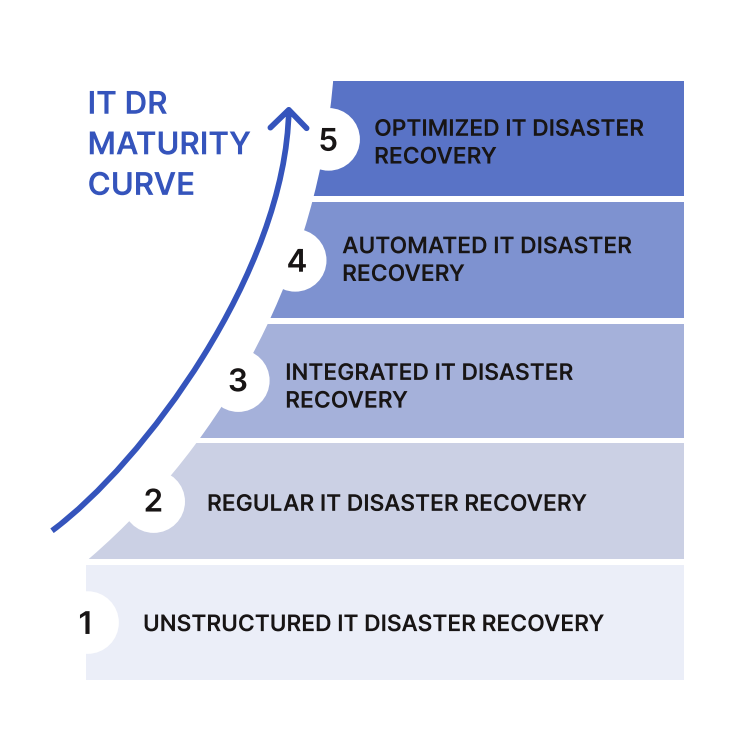
Stage 1: Unstructured IT disaster recovery
Self-governed IT DR with individuals finding their own ways to deal with their recovery needs. The process is random and undocumented and generally has no dedicated resources or budget. This approach is reactive rather than proactive.
Recovery plans are:
- Completely manual
- Usually paper or spreadsheet-based
- Not necessarily built for every application or service
- Tested infrequently (if at all)
- Consume a large amount of organizational effort to plan and execute - sometimes as long as 12 weeks
To reach stage two, you need to set the foundations of IT DR and then scale and improve. Think about:
- What systems and applications you are going to assess
- How often you should prove your recovery capability to gain confidence in your ability to recover
- What types of testing you should consider and the scale of testing you’re going to perform
- What data and activities you should include in your application recovery plans
- Which services are in scope
- Who needs to be included in the process of proving your recovery plans
Stage 2: Regular proving of your IT disaster recovery capability
Although disaster recovery pro - cesses are managed at the depart - mental level at stage two and are more structured, they are still siloed and have few resources dedicated to them. RTOs, if defined, may not be regularly measured and assessed. There is increased confidence that the organization can effectively and quickly recover from a total loss scenario and recovery plans exist in an executable form such as automated runbooks.
To reach stage three, augment the recovery steps and actions with integrations to configuration management database (CMDB) or IT service management (ITSM) plat - forms. This is a necessary step in adding appropriate service- and application-related data that is both useful in understanding your recovery plan and the recovery itself.
Stage 3: IT disaster recovery with integrations to ITSM and CMDB
At this stage, senior management is bought in and committed to fund - ing recovery efforts. There is regular testing across all departments, the process is defined in regularly updated runbooks, and there are some integrations between technology resilience tooling and the ITSM suite for change, problem, and configuration management. According to our survey of over 300 IT decision makers, 92% of enterprises say it’s important to integrate disaster recovery with ITSM and CMDB tooling.
To reach stage four, leverage automation to improve IT DR testing. When you automate repetitive, manual tasks, you free your people up to concentrate on high-value activities and reduce execution time.
Stage 4: IT disaster recovery with automation and improved scenario coverage
When your organization reaches stage four, you are moderately prepared for disaster recovery but not fully mature. Recovery staff are funded, recovery plans are documented in runbooks, and RTOs are defined but there are still silos. Some business units may have achieved a high state of preparedness but this is not entirely consistent across the board.
At this stage, organizations will start automating manual activities where appropriate and will have recovery plans for all criticalities of applications and services. In our survey of 300 IT decision makers, 72% note that DR needs to be more automated within the next 12 months to avoid serious service disruption and any associated reputational and financial consequences.
The addition of automation can lead to a reduction in recovery time actuals (RTAs) and allows team members to focus on higher-value activities rather than being bogged down in manual processes. This increases confidence that the organization can quickly and effectively recover applications and services. To reach stage five and optimize your IT DR, you need to gain the ability to test like you’re responding to a real incident by reducing the time to prepare for the event and reducing the amount of time to execute the response.
Stage 5: Optimized IT disaster recovery
At the fifth and final stage, IT DR is state of the art, there are inte - grations across the technology recovery stack, and the system of execution is an automated recov - ery plan that everything integrates to. With this setup, progress can be viewed in real time, there is continuous improvement to the process based on audit logs, and senior management participates in recovery activities. Change control methods and continuous process improvement keep the enterprise at a high state of preparedness and able to adapt to changes in the business environment.
What are the best practices for IT disaster recovery success?
Now that you know what level of IT DR maturity your organization is at, how can you adopt best practices to progress along the IT DR maturity journey to reach stage five where disaster recovery is optimized? Follow these five steps to build and run an effective IT DR plan:
- Assess the criticality of your IT infrastructure
Make sure that the documentation of which networks and applications are mission critical is up to date and easily accessible so that their recovery can be prioritized. Once you’ve defined the different tiers that your networks and applications fall into and assigned appropriate RTOs based on how critical they are to the business, you can structure your recovery plans accordingly.
- Build service-level recovery plans
Recovery plans should describe how to recover the functions you are responsible for and the steps required to bring each function back online, including both the technical and business steps that need to be taken. All of these service-level recovery plans come together to form your overall IT DR plan.
- Enhance your IT disaster recovery plan with automation and integrations
When undergoing a test or live recovery, you will likely need to use data from various ITSM or business continuity management (BCM) tooling such as ServiceNow, Remedy, or Fusion RM. By integrating these with your IT DR plan, you can bring in data that is mastered elsewhere into your recovery plans - this could include the last known configurations of infrastructure that you’re failing over, RTOs, and more. This can also apply to mass communications platforms such as Microsoft Teams or Slack integrated with your plans to keep everyone updated on when they need to initiate their tasks.
- Measure RTAs against RTOs to assess recovery effectiveness
As you define the critical recovery tiers and associated RTOs for the various functions in your network, you should think about how you would separate those activities to calculate RTAs - this might be all the activities in your recovery tiers or just a subset. If you’re not meeting your RTOs, you will need to assess where bottlenecks are occurring and where you can make improvements to your planning and execution.
- Use an automated runbook platform for recovery
An automated runbook platform provides you with a foundational platform to host and execute all of your recovery plans. In the next section, we’ll go into more detail about what automated runbooks are and how they can improve your IT disaster recovery plans.
Why use Automated Runbooks?
Automated runbooks can be tremendously useful for managing the important technology that underpins how large organizations serve their customers and staff. They reduce risk and increase the efficiency of critical processes such as recovering services following a cyber attack or technology outage, as well as patching, updating, and migrating technology.
Organizations have lots of software that helps them manage technology such as IT service management platforms, Infrastructure as Code (IaC) tools, monitoring, and communications. People are generally required to join these things together as nothing is completely software defined. Without automated runbooks, teams can inadvertently cause errors which can have catastrophic consequences. Automated runbooks help to join up the manual and automated activities end to end, sequencing them and guiding them to significantly reduce error rates. They also provide a good source of audit trails to make compliance a lot easier.
There is sometimes confusion about what an automated runbook actually is. The following methods are not automated runbooks and present significant risks:
Static documents held in repositories such as Confluence or in the form of spreadsheets, word documents, PDFs or other manual non-executable non-integrated disconnected formats.
Scripts such as IaC tools (Ansible, Terraform, etc) that automate singular recovery tasks such as provisioning a server.
Although these may be useful tools for managing your IT operations, they don’t provide the functionality of an automated runbook. Automated runbooks provide auto - mated orchestration, analytics and dashboards, and integrations with an organization’s technology stack to manage complicated workflows and procedures in IT operations, including IT disaster and cyber recovery, cloud migration, and technology release.
The benefits of automated runbook technology are:
- The ability to create consistency across your application operations with a centralized template repository
- Standardization and automation of your global communications in one place, so the right people are engaged at the right time
- Visualization of critical paths to gain real-time visibility and reporting on execution
- Immutable and auto-generated audit logs to help meet regulatory compliance
- Post-execution analytics to enable the identification of areas for process improvement
- Integrations to third-party solutions and applications to extend the value of your existing technology
7 reasons to use Cutover automated runbooks for IT Disaster Recovery
Cutover helps enterprises deal with the increasing complexity of managing their IT infrastructure to deliver important business services through effective collaboration between people and automation. We call this Collaborative Automation and through it, we aim to help enterprises reduce risk and cost and increase efficiency in their IT disaster recovery. Here are seven reasons why you should use Cutover’s dynamic, automated runbooks for your IT disaster recovery plans
- Runbook templates
Each IT disaster scenario requires a unique set of recovery tasks, which can cause confusion and chaos when creating, organizing and accessing the plans. To improve repeatability and governance, Cutover’s runbook templates help create standardization across each recovery scenario. Using Cutover, you can create approval workflows for runbook templates to ensure governance, reduce inefficiencies, streamline workflows, and execute your runbooks with confidence. Cutover’s platform then acts as a centralized repository for all automated runbook templates and active runbooks for easy access and organization.
- Recovery orchestration
Without runbook automation, there is a heavy reliance on individuals to manually orchestrate the teams and tasks involved in a particular opera - tion. This can involve manually updating spreadsheets, spending hours on bridge calls, and contacting individuals by phone or email to let them know when to start their tasks. With automated runbooks, this manual effort is removed. Cutover’s automated runbooks orchestrate this complex sequence of tasks, ensuring that teams and technology follow the set path in the correct order by automatically notifying people when to start their tasks and triggering automated processes. When orchestration is auto - mated in the runbook, there is no need for a person to manually sequence the tasks or spend time letting teams know when they need to take action.
- Real-time visibility and reporting
With Cutover’s automated runbooks, the progress and status of activities are automatically reported in real time and freely available for stakeholders and teams to self-serve, so they don’t have to wait to be given progress updates. This also applies to the real-time progress of multiple runbooks at the same time, providing a comprehensive overview of all your in-progress activities.
- Dynamic adjustment to recovery execution
Cutover’s automated runbooks can be dynamically adjusted during execu - tion by API or users that have the correct permissions, allowing for the pro - cess to adapt as needed on the basis of new information or requirements. This is particularly useful during events such as cyber recovery where you may be getting new information about the extent of the outage after the recovery has begun. The runbook may also contain sub-routines or snippets of tasks that can automatically repeat until a set of conditions has been reached, such as checking the health of a service and acting on it or retrying the automation scripts. You can also include logic-based tasks to automatically determine the best path forward when certain conditions or variables are met. This removes the need for manual intervention and improves the overall orchestration and execution of runbook tasks. It can also be helpful to link runbooks in a parent/child relationship, for example, having an IT disaster recovery parent runbook that has hundreds or thousands of specific recovery runbooks for each individual application or service feeding into it.
- Integrations and API
Cutover’s automated runbooks have powerful integrations to third-party platforms that create a single source of execution. This increases flexibility and productivity and reduces the risk of human error. Likewise, an automated runbook will have a well-defined API that allows you to create or query runbooks, tasks, or teams directly from third-party platforms.
- Post-execution analytics and regulatory compliance
Cutover’s automated runbooks automatically record the timing and execution of tasks for reporting and generating an audit trail that is not editable. This serves as a record of performance for auditing, continuous improvement, and regulatory compliance purposes.
- Scalability
The number of tasks, users, dependencies, parallel tasks, and runbooks being executed at the same time runs into the thousands to deliver enterprise-grade capability in the Cutover platform. Cutover has been proven in some of the world’s largest and most sophisticated organizations including the top three US banks