


Your ultimate guide to runbooks
Runbooks are traditionally defined as “a compilation of routine procedures and operations that the system administrator or operator carries out,”typically in relation to the operation of a computer system or network.Today’s runbooks are usually electronic, although paper runbooks that have to be updated by hand have been used for incredibly complex tasks, including landing on the moon!
Runbook types
The different types of runbooks fulfill different roles:
- Manual runbooks provide step-by-step instructions that enable team members to use standard tools to complete described tasks. They are often a first step in standardizing tasks and operations but can involve a lot of manual work and be prone to human error.
- A fully-automated runbook completes basic tasks using automated tools without the need for human intervention.
- A collaborative automated runbook uses a combination of tasks carried out by people and automated solutions to manage complex operations. Repetitive, manually-intensive tasks are automated but people still have full visibility and control and are able to make informed decisions at critical points.
Runbooks ensure that everyone involved in a specific operation knows their role while also providing easy access to all the information they need. Not only does this improve overall performance, it also reduces system downtime when used for disaster recovery, supporting the productivity and output of the wider organization.
The benefits of using runbooks
Here are some of the top benefits of using runbooks:
Standardize repeatable processes:
Runbooks enable you to standardizeand codify tasks and procedures forprocesses such as IT disaster recoveryor cloud migrations. They ensure that everyone involved has the tools, expertise, and information needed to complete their role without having to be on multiple calls or hunt through spreadsheets.
Improve IT disaster recovery:
Whether it’s an outage or data breach,an IT incident can be highly disruptive to organizational operations and, worse, customers. IT disaster recovery runbooks give IT personnel the tools they need to restore infrastructure, recover lost data, and stabilize IT functionality. In addition to detailing necessary incident management steps and procedures, IT disaster recovery runbooks also enable key stakeholders to stay informed of progress throughout.
Optimize existing resources:
Runbooks enable internal teams to access information more quickly and complete complex tasks more efficiently. This dramatically shortens the time to value for major strategic initiatives like cloud migrations and application releases while freeing teams up to focus additional time and energy on other high-value activities.
Streamline cloud migration:
Cloud migrations are highly complex processes that involve numerous tasks and stakeholders. Runbooks can be used to outline the path to success, reduce the likelihood of mistakes, and ensure you’re able to derive the efficiency and flexibility of the cloud in as little time as possible.
Why you need automated runbooks
Work is increasingly complex and risky. When it comes to real-time execution, companies are still using ineffective processes that rely on multi-versioned documents, disparate data sources, and fragmented communications across multiple channels. This leaves organizations unable to effectively orchestrate people and technology, gain access to real-time data-driven insights, or ensure the smooth execution of their best-laid plans. When every second of every minute counts, this is a major cause for concern.
These challenges are exacerbated when organizations have to rely heavily on static documents, disparate datasources that don’t update in real time, and fragmented communications across different channels and they lack realtime visibility into the end-to-end flow of work.
Have you ever wasted precious execution time searching for the right version of a specific document? Have you ever wished that you had better visibility into what was happening at that very second and could more easily access real-time data? Have you struggled to find a data source or had to wait until long after an event was completed to analyze its performance? Have you ever had to deal with answering too many instant messages, emails, and phone calls while you’re busy trying to execute a flow of work—when all you want todo is focus on the task at hand? Have you ever wanted one single source of truth for all teams involved in a particular work activity? If you answered ‘yes’ to one or many of these questions, you’re not alone.
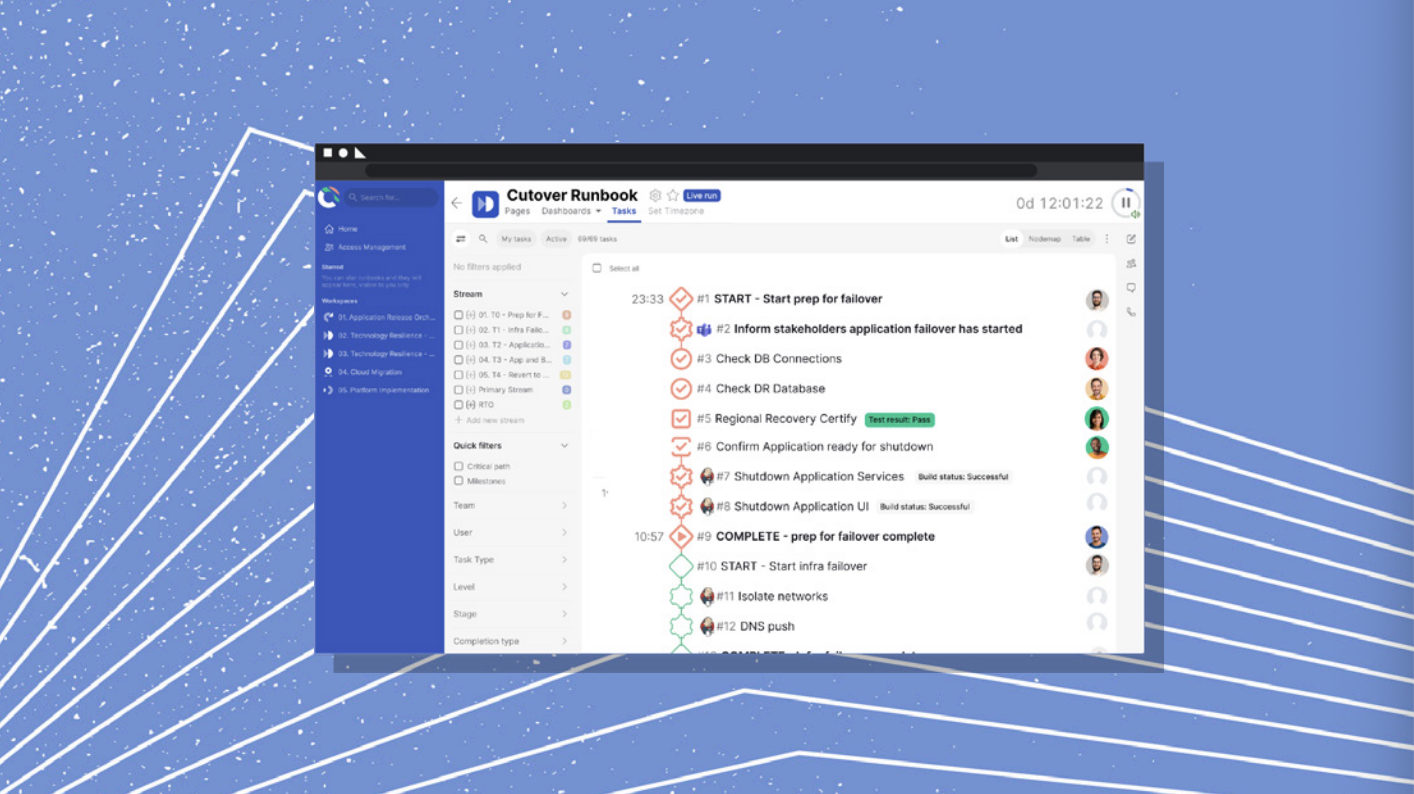
Introducing automated runbooks
Humans are great at a lot of things, but we are notoriously bad at consistently executing repetitive, manual processes. We get bored, distracted, or hungry, we have good days and bad days, all of which prohibit our ability to continuously complete repetitive tasks well. Machines, on the other hand, don’t have any of our human ‘flaws’ that cause these inconsistencies. As long as you prepare and power them, machines can execute these types of actions for days, weeks, and months. By leveraging automation, teams get the opportunity to focus on what they do best: the creative, innovative, or collaborative tasks, activities requiring judgement, and ‘grey areas’ to be evaluated.
This is where Cutover runbooks come in. Cutover has created an environment where automated tasks and human-driven actions work side by side, so teams can move quickly with confidence.
With automated runbooks, you can now join together all the tools you use in technology resilience, cloud migration, and release workflows. If you’re using a handful of different tools to get programs of work done, it’s easy for teams to spend too much time moving between interfaces, with people becoming the coordinating ‘middlemen’ between tools with the capacity for automation.
Cutover offers seamless integration with over 20 tools, from project management tools like Jira, to build tools such as CircleCI, and marketing and sales tools such as Salesforce and Hubspot, Cutover’s automation runbooks streamline your operations by enabling you to work in one place. You can even set up notifications to alert teams when human interaction is needed during an automation runbook.
It’s time to ditch the spreadsheets and work smarter by incorporating technology and automation into your runbooks processes. Remove the manual and repetitive tasks to free up your time.
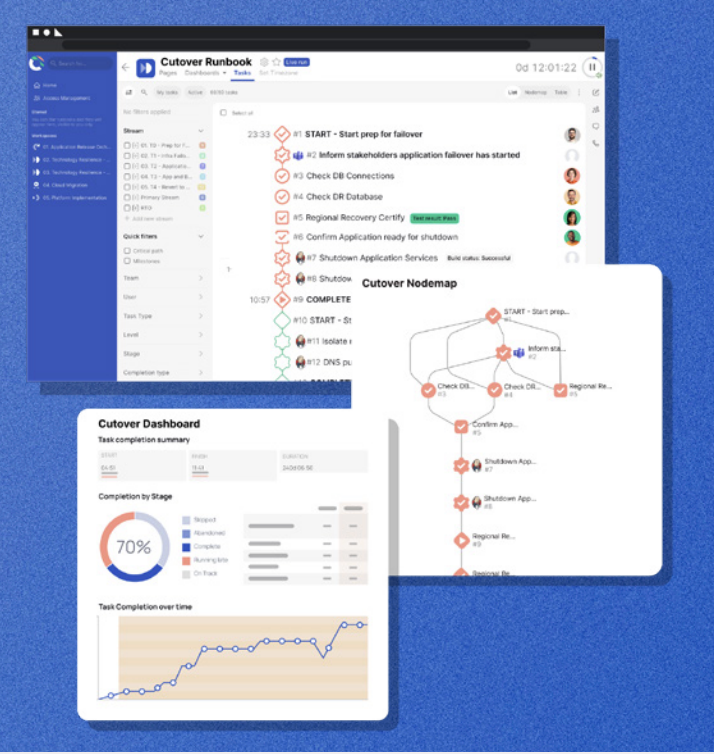
Key features of Cutover runbooks include:
- Real-time analytics
- Intuitive dashboards
- A single source of truth for complex projects
- An indelible audit trail
- Easy communications across your organization
- Seamless integrations
For more details, check out the Cutover automation runbook fact sheet.
.webp)