It’s critical to understand your recovery responsibility and employ best practices to ensure the resiliency of your workloads. This eGuide will highlight some of the challenges that come with managing resilience and disaster recovery in the cloud and how to overcome them.
What are cloud providers not telling you about disaster recovery?
The technical and business benefits of migrating applications to the cloud are far reaching - operating in the cloud can help you to lower operating expenses, improve scalability, lower infrastructure costs, and more. However, there isn’t a lot of transparency around the complexity of managing and recovering workloads in the cloud and the implications this can have for resilience.
Lesson #1: Cloud disaster recovery is a must-have, not a nice-to-have
Migrating to the cloud doesn’t provide out-of-the-box resiliency. The recent Uptime Institute Data Center Resiliency Survey states that most companies say cloud is only resilient enough for some workloads.
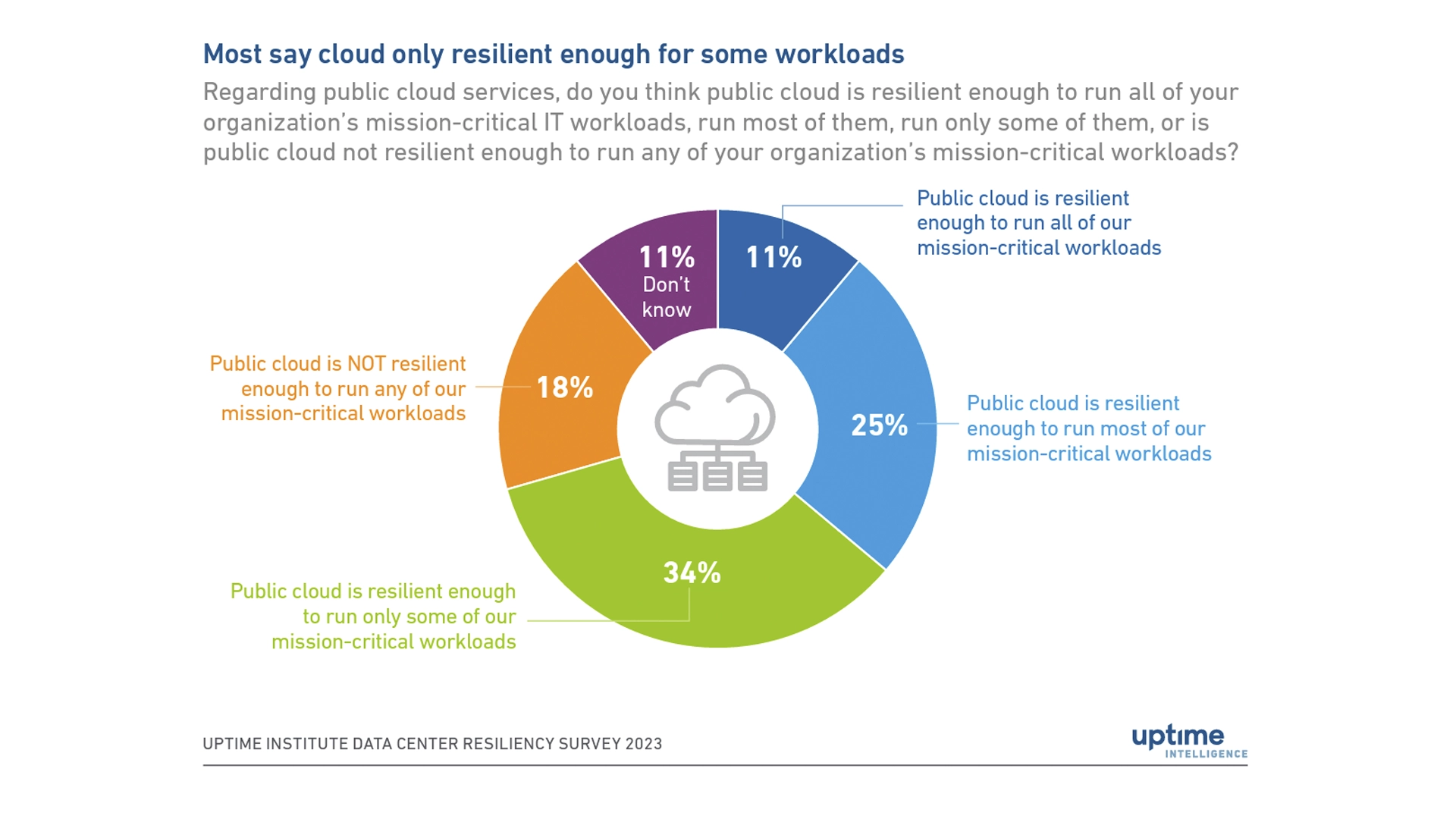
For highly regulated industries, like financial services, it’s imperative that your disaster recovery procedures encompass all applications and workloads, whether on-premises or cloud-based, and are comprehensive, well-documented and tested.
Lesson #2: Moving to the cloud doesn’t remove your responsibility for resilience
While your workloads are in the cloud and your cloud provider is managing and protecting the infrastructure, you’re not off the hook. With Infrastructure as a service (IaaS), you are responsible for the workloads, security, middleware, and guest operating systems. This includes outlining recovery time objectives (RTOs), testing and tracking recovery time actuals (RTAs) and the ownership of the overall availability and recovery.
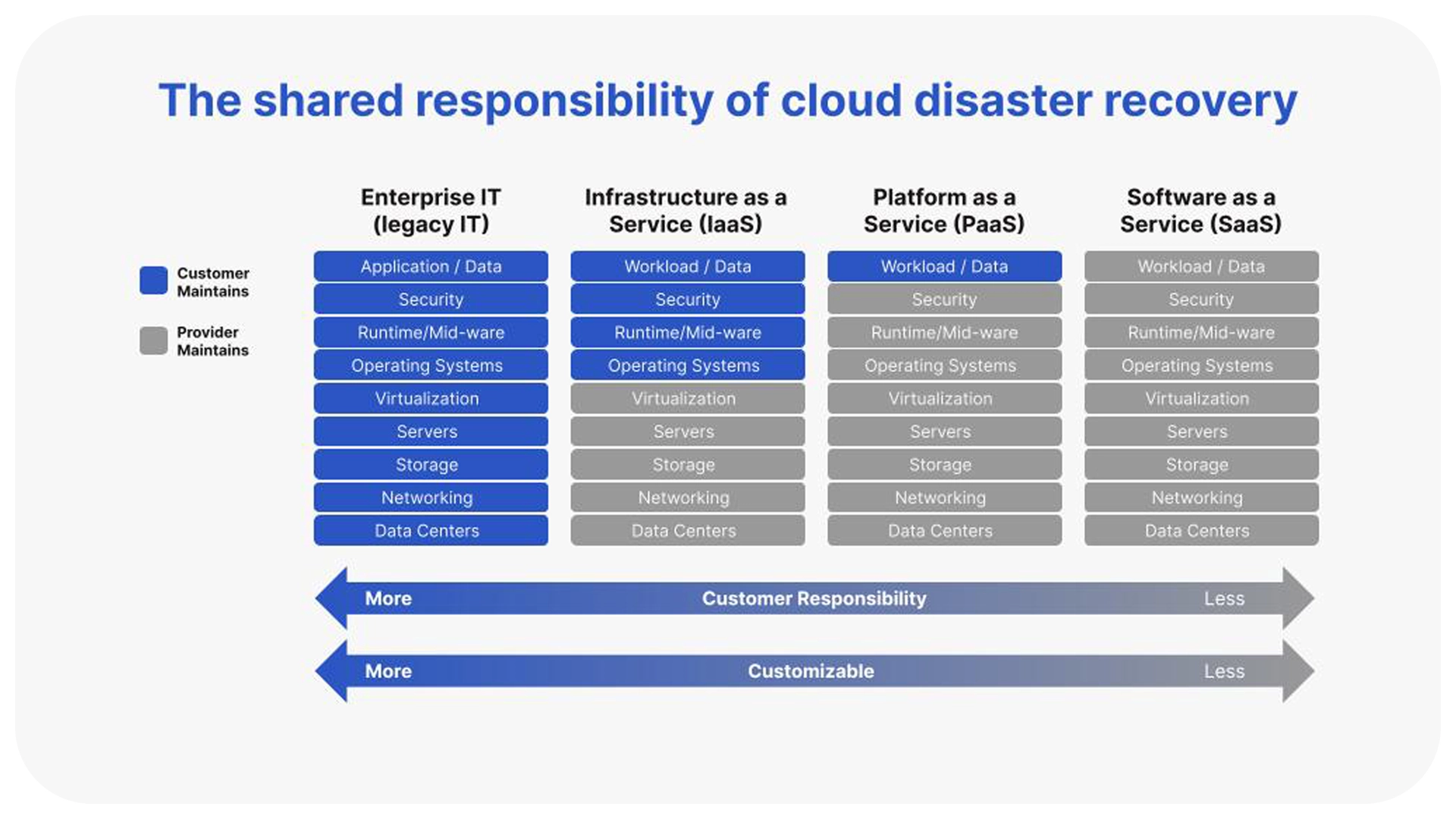
Before you plan your disaster recovery procedures and define recovery time objectives, it’s critical to fully understand who owns the recovery of your cloud application and services.
Figure 1 above illustrates the responsibility of managing application and services in the cloud. As you migrate to the cloud, your disaster recovery procedures will require updates. You’ll be managing multiple RTOs and recovery point objectives (RPOs) and continually improving RTAs.
Lesson #3: Multiplying the disaster recovery strategies in the cloud multiplies the complexity
Typically you’ll use a combination of strategies during your cloud migration. AWS, the largest public cloud provider, outlines 7Rs for cloud migration. Of the 7Rs, refactoring makes changes to the application layer so it works better in the cloud. Refactoring most often includes building in containers and microservices to ensure the application is optimized within the cloud compute architecture. If you refactor applications before a cloud migration, the re-architecture should be built with scalability and resilience into the application itself. However, rehosting, or lift and shift, is the most common cloud migration approach. During rehosting the application is already virtualized, so there are no significant changes and the move to a cloud providers’ infrastructure is much easier.
Once in the cloud, disaster recovery complexity abounds. Your cloud architecture setup determines the level of high availability (HA) built into the infrastructure and disaster recovery strategy determines the backup and recovery processes.
What is a cloud disaster recovery strategy?
A cloud disaster recovery (DR) strategy is essential for ensuring business continuity and involves four main approaches categorized as Active/Passive or Active/Active. Active/Passive strategies, such as Backup and Restore, Pilot Light, or Warm Standby, use one active site for traffic and a passive site for failover, offering varying levels of complexity and cost. Active/Active (Multi-Site) models are generally the best approach for mission-critical workloads as they provide assurance that systems will not go down during an outage. Ultimately, cloud DR moves beyond simple data center failover, requiring you to manage multiple strategies based on the category of each workload across different regions or availability zones.
Example of a cloud disaster recovery setup:
- Mission-critical applications: An Active/Active disaster recovery strategy across multiple regions that provides near-zero data loss and has RTOs in the seconds, but comes at a very high price.
- Business-critical applications: Active/Passive strategies, either Pilot Light or Warm Standby, provide you a good balance of benefits and cost.
- Low priority applications: Active/Passive in a single availability zone which restores backups after the outage with RTOs within 24 hours at a low cost.
Lesson #4: Outages still occur and are increasing in cost
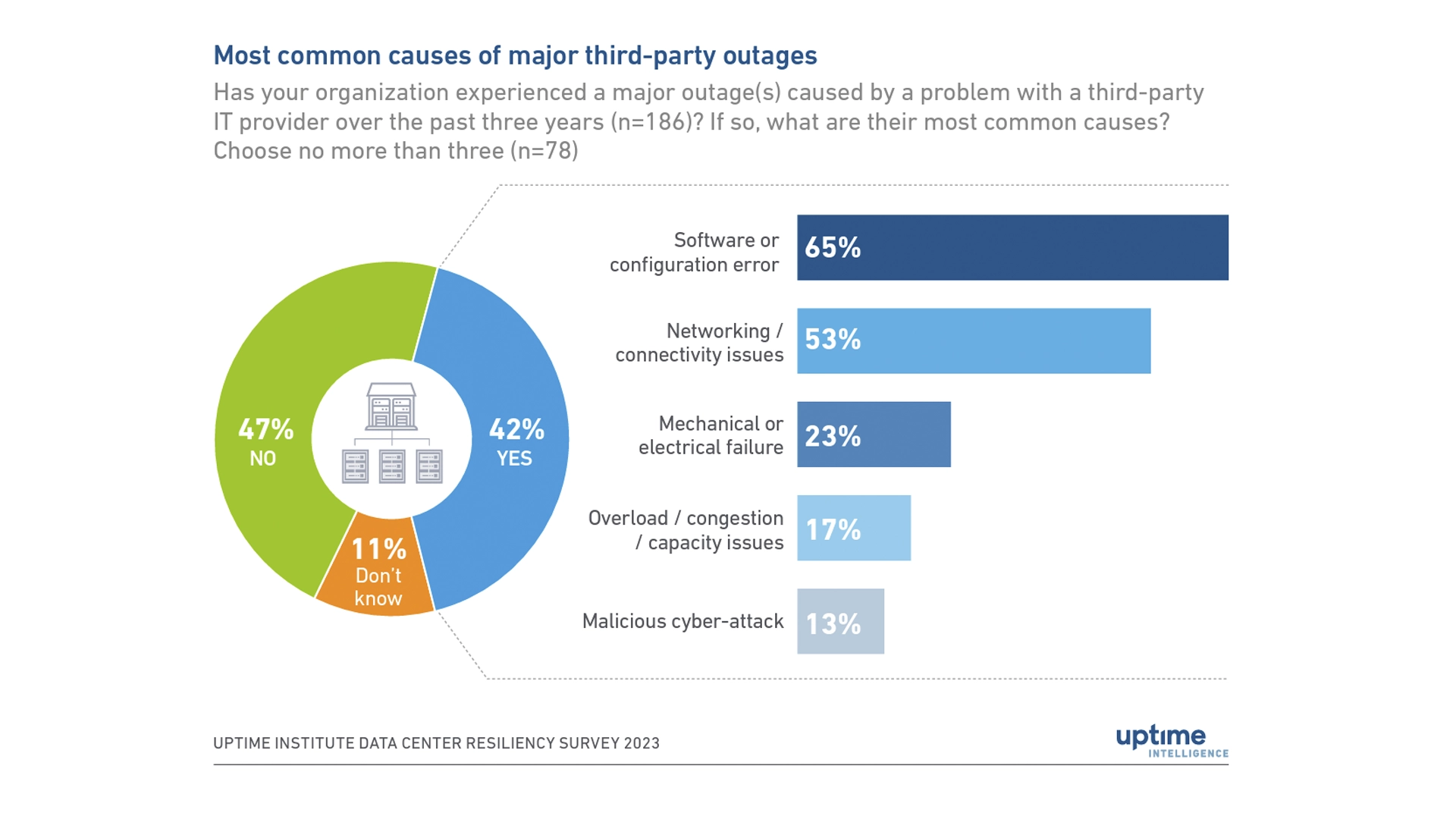
Outages and downtime are inevitable, so it's important to be prepared. Even if the outage isn’t caused by the cloud provider, human errors account for a growing number of outages and this will continue to be a major concern for enterprises as more complex workload architectures are built to take advantage of the cloud. Uptime Institute estimates that “human error plays a role in two-thirds to four-fifths of all outages.” And, in the past three years, nearly 40% of enterprises faced an outage caused by human error.
Uptime’s survey shows “the proportion of single major outages costing over $100,000 is increasing.” While the risk of downtime may be decreasing each year, when an outage occurs it’s increasingly more expensive. Various factors contribute to why outage expenses are increasing. Inflation, fines, service-level agreement breaches, the cost of labor, and a growing dependency on digital services all play a role in the rising costs.
Seven recommendations to standardize cloud disaster recovery
As you plan your disaster recovery strategy, here are seven recommendations to keep in mind.
1. Understand recovery responsibility
Before you can outline your cloud disaster recovery strategy and procedures, you need to fully understand which components of the technology stack you need to recover and which layers your cloud provider handles.
2. Outline disaster recovery strategies and procedures by type of workload
Mission-critical, business-critical, business operational and administrative applications and services. Once you understand recovery responsibility, outline your disaster recovery strategies by workload type. Each strategy will vary in cost, recovery time and level of effort so it’s critical to prioritize mission-critical applications that have the biggest impact on customer experience and revenue.
3. When planning for failover scenarios ensure you have enough capacity from your cloud provider
When workloads failover you might not be guaranteed enough compute capability to meet your peak workloads scale requirements. This makes it essential that you recover your primary site as quickly as possible. Only with a well defined and automated disaster recovery strategy will you be able to recover and bring all traffic back to the main production workload instance.
4. Align objectives with business owners and collaborate with key stakeholders throughout the process
Collaboration and communication are key to any successful process. It’s important to get senior leadership buy-in as you outline disaster recovery strategies so there is complete alignment before an event occurs. When executing a test or recovering from an outage, keep all teams and leaders informed on progress with real-time updates on all open and completed tasks.
5. Regularly test and update disaster recovery processes
Practice like you play. You need to regularly exercise cloud disaster recovery procedures to ensure that when an outage occurs your teams can get systems back up and running as quickly as possible, meeting RTOs.
6. Utilize a common template repository and execution engine
Well-documented disaster recovery procedures still require regular updates and testing, as mentioned above. Centralizing all processes in one place with disaster recovery templates provides a system of truth, saving teams time and providing confidence.
7. Automate repetitive tasks as part of a bigger automation strategy
Automation plays a critical role in increasing productivity and reducing manual disaster recovery efforts. While there’s lots of tasks that can be automated, it’s important to think through your automation strategy and how it aligns to overall business objectives.
How to standardize, document, and automate cloud disaster recovery runbooks
Regardless of where you are in your cloud migration or modernization journey, cloud resilience is a critical component. Consider the complexities of your cloud architecture as you build or enhance your disaster recovery strategies. Automated runbooks and cloud disaster recovery solutions help enterprises streamline testing and recovery procedures, reduce manual effort and errors, and mitigate risks.
Cutover’s AI-powered runbook platform enables enterprises to standardize and centrally store recovery procedures and execute disaster recoveries for complex cloud deployments while reducing risk and cost, and enabling better collaboration between teams and automation.
Contact us or schedule a demo today to learn more.